
Kaspersy Antivirus and Internet Security 2013 software and Key.
You can download the software and key.

WIndows 8
New Microsoft OS.

Majalah PC
"Majalah Pc" is Malay version of ICT magazine that have many useful information about computer.

LiveWatch V
Telefon Pintar sebagai Jururawat.

Bitdefender Antivirus and Internet Security 2013 software and key
You can download for free. The key is cheap.
Showing posts with label software. Show all posts
Showing posts with label software. Show all posts
Monday, 15 August 2016
Sunday, 7 September 2014
DOWNLOAD DREAMWEAVER CS3
http://downloads.ziddu.com/download/24033476/Adobe-Dreamweaver-CS3.rar.html
Just click the above link.
Just click the above link.

Monday, 21 July 2014
Download Xilisoft Video Converter Ultimate v7.0.1 + Crack-Serials [ChattChitto RG]
Just click >>> http://downloads.ziddu.com/download/23920025/r-Ultimate-v7.0.1--Crack-Serials-ChattChitto-RG.rar.html
Video of Xilisoft>>>


Video of Xilisoft>>>
how to download:
Wednesday, 11 June 2014
Sunday, 19 January 2014
Thursday, 1 November 2012
Alternative for Office Suite
There are many open source software that give the service like word-processing, spreadsheet, and presentation that can download easily for free.
The software are:
1. Apache OpenOffice > www.openoffice.org

2. LibreOffice > www.libreoffice.com

3. NeoOffice > www.neooffice.org
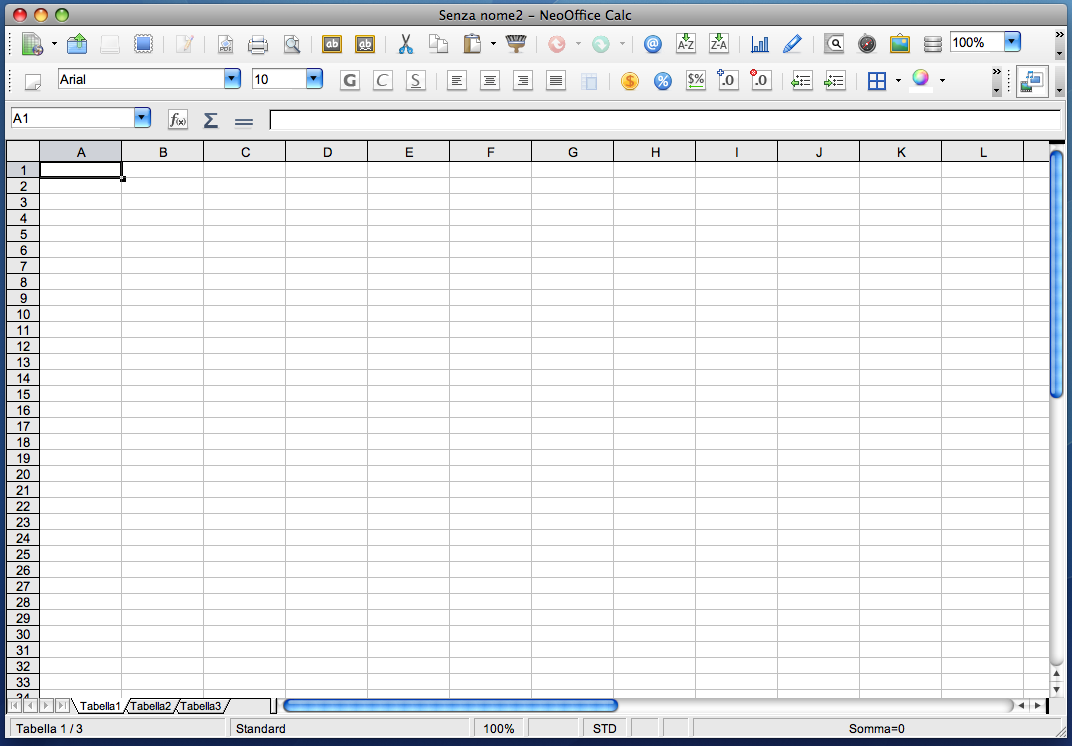
4. Google Docs > docs.google.com

5. Koffice > www.koffice.org

The software are:
1. Apache OpenOffice > www.openoffice.org
2. LibreOffice > www.libreoffice.com
3. NeoOffice > www.neooffice.org
4. Google Docs > docs.google.com
5. Koffice > www.koffice.org
Wednesday, 12 September 2012
BitDefender - 2012 Top Antivirus Rankings
2012 Top Antivirus RankingsTop Ten Antivirus 2012 Here is the list of the best antivirus and security software of all times. Among the top are BitDefender, ESET, Norton, F-Secure, Kaspersky, TrendMicro, AVG, Avira, Zonealarm, Panda security and more. We will be running comparisons between different versions of the same security software, for eg., 2011 version vs 2012 version. We will be also comparing between the capabilities of different security software, for eg., BitDefender vs Norton. Based on the performance of various different antivirus security software, we will give them scoring. The factors on which we will score antivirus software: Speed, stealth, detection, link scanning, removing virus, updates, blocking bad websites, blocking phishing attempts, technical support and lots more factors. These are the antivirus programs we will be testing to come up with our top ten antivirus list: Top Ten Antivirus 2012 1. BitDefender Antivirus 2012 2. McAfee Antivirus 2012 3. Kaspersky Antivirus 2012 4. ESET Antivirus 2012 5. Norton Antivirus 2012 6. F-Secure Antivirus 2012 7. Vipre Antivirus 2012 8. TrendMicro Antivirus 2012 9. ZoneAlarm Antivirus 2012 10. Panda Antivirus 2012 Other Antivirus Programs Avira Antivirus 2012 Avast Antivirus 2012 Avanquest Antivirus 2012 G Data Antivirus 2012 Webroot Antivirus 2012 PC Tools Antivirus 2012 Comodo Antivirus 2012 CA Antivirus 2012 Norman Antivirus 2012 AVG Antivirus 2012 Sophos Endpoint Security 2012 Quick Heal Antivirus 2012 Microsoft Security Essentials 2012 Top Ten Antivirus Ratings Most of these antivirus software have been tested extensively for their performance. The old versions have received ratings based on the performance to quickly detect viruses from infected systems and stop new viruses from infecting the computers. There is a very strong criteria that will be used to provide points to various antivirus software 2012. Another interesting factor that we are considering is the antivirus coupons, we will give scores to antivirus software companies that offer discount coupons from time to time. Although this is not a major factor, but many users value coupons because it is a good way to save money on security software. Although this factor will not inflate the original ratings, we are including it only to help people save money. These are the factors that will contribute to the scoring: Speed: When it comes to computing, speed is an important aspect that we can't neglect. It has been reported that some antivirus software are much slower in comparison to other antivirus software. Which means, some antivirus programs slow down a computer. Computer users (specially gamers) like using antivirus software that does not degrade the performance of a computer system. They enjoy using the fastest antivirus software. Stealth: Many viruses and spyware are designed to deactivate antivirus programs so that they are not detected. Antivirus software should quickly detect such a threat and stop the virus from harming the system files. Those antivirus software will receive higher score that can not only defend against known viruses but also protect a computer system from new and unknown virus and spyware. Detection: A good antivirus program will quickly detect infection and will take the necessary steps to quarantine the infected files in order to stop the virus from spreading to other system files. Only if security software has the capabilities of detecting infection, it can stop a virus/spyware. So this is a major aspect of security software. Many poorly designed security software cannot detect all forms of threat. However, only those antivirus software will be included in our top ten antivirus 2012 list that are capable of detecting all sorts of threats. Technical Support: We will also provide scores depending upon the type of technical support and customer service provided by the antivirus software manufacturer. Only those programs will receive higher ratings that are bundled with quality support. We will also count on the type of support available: phone, chat, email, etc. When your computer system is infected with virus, spyware or other forms of malware, you need quick assistance. That's when you need to contact someone who is technically equipped to assist you. Based on the quality of technical support, scores will be provided to various security software and hence will win a rank in our top ten antivirus 2012 list. Price: Antivirus software should not be too costly, it should be reasonably priced. We will be comparing the price of antivirus software and will be providing scores based upon how cheap is the antivirus software. The cheapest and the best antivirus 2012 will receive higher rankings. People love saving money, so the cheapest antivirus software will receive higher scores. These are some of the major factors we will be using to rate the best antivirus software of 2012. We will also include other factors like real-time scanning, frequency of updates, blocking phishing attempts, link scanning, IM protection, parental lock and lots more factors. However, we will majorly focus on the 5 key-points mentioned above. Based on these factors, we will provide our lab test reports that will show you which antivirus software is best for your computer in the year 2012. Most antivirus manufacturers will release their 2012 antivirus software sometime in May or June this year. If you have any questions or suggestions about this report of top ten antivirus 2012, please leave your review below by leaving a comment.Download link: |
DOWNLOAD LINK:
http://download.bitdefender.com/windows/desktop/i_security/2012/en-us/bitdefender_is_2012_32b.exe
http://download.bitdefender.com/windows/desktop/i_security/2013/en-us/bitdefender_is_2013_32b.exe
BitDefender Internet Security 2012 - (64 bit)
http://download.bitdefender.com/windows/desktop/i_security/2012/en-us/bitdefender_is_2012_64b.exe
http://download.bitdefender.com/windows/desktop/i_security/2013/en-us/bitdefender_is_2013_64b.exe
BitDefender Antivirus 2012 - (32 bit)
http://download.bitdefender.com/windows/desktop/av_plus/2012/en-us/bitdefender_av_2012_32b.exe
http://download.bitdefender.com/windows/desktop/av_plus/2013/en-us/bitdefender_av_2013_32b.exe
BitDefender Antivirus 2012 - (64 bit)
http://download.bitdefender.com/windows/desktop/av_plus/2012/en-us/bitdefender_av_2012_64b.exe
http://download.bitdefender.com/windows/desktop/av_plus/2013/en-us/bitdefender_av_2013_64b.exe
BitDefender Total Security 2012 - (32 bit)
http://download.bitdefender.com/windows/desktop/t_security/2012/en-us/bitdefender_ts_2012_32b.exe
http://download.bitdefender.com/windows/desktop/t_security/2013/en-us/bitdefender_ts_2013_32b.exe
BitDefender Total Security 2012 - (64 bit)
http://download.bitdefender.com/windows/desktop/t_security/2012/en-us/bitdefender_ts_2012_64b.exe
http://download.bitdefender.com/windows/desktop/t_security/2013/en-us/bitdefender_ts_2013_64b.exe
* Minimum requirement :
- 1 Gb RAM
Wednesday, 8 August 2012
HFS ~ Http File Server : the other way to share your files
What is it?
... it's file sharing ... it's webserver
... it's open source
... it's free
... it's guaranteed to contain no malware
Features
Download and upload, Virtual file system, Highly customizable, HTML template, Bandwidth contro, Easy/Expert mod, Log, Accounts, Dynamic DNS updater
DOWNLOAD

HFS is a single executable file.
No need to install.
Download and run... it's up & ready!
Working on Windows (all 32bit-versions), Wine/Linux.
Beta versions available on the forum. No need to install.
Download and run... it's up & ready!
Working on Windows (all 32bit-versions), Wine/Linux.
For programmers: download sources (created with Turbo Delphi).
Do you support PADs? Here you go!
Please, if you make link for downloading HFS somewhere, use the link you find here above, don't link the file directly, this way i can count downloads.
Reference : http://www.rejetto.com/hfs/
How to Edit PDF Files without Adobe Acrobat
he PDF file format was originally created by Adobe in the early ’90s and there are now over 700+ million PDF documents on the Internet according to Google (search for filetype:pdf).
There are several reasons why the PDF file format is so popular for exchanging all sorts of documents including presentations, CAD Drawings, invoices and even legal forms.
We will primarily focus on tools that let you alter the actual contents of a PDF file>. If you are looking to manipulate the PDF file structure itself like rearranging pages or merging multiple PDFs into one, please refer to this detailed Adobe PDF Guide.
You can perform such edits in a PDF easily with PDFEscape.com, an online PDF editor that is free and also lets you edit password-protected PDF documents in the browser.
With PDF Escape, you can hide* parts of a PDF file using the whiteout tool or add annotations with the help of custom shapes, arrows, text boxes and sticky notes. You can add hyperlinks to other PDF pages / web documents.
[*] Hiding is different from redaction because here we aren’t changing the associated metadata of a PDF file but just hiding certain visible parts of a PDF file by pasting an opaque rectangle over that region so that the stuff beneath the rectangle stays invisible.
The tool can also be used for removing PDF passwords as well as for encrypting PDF documents such that only users who know the password can read the contents of your PDF files. And since this PDF metadata cum bookmarks editor can be executed from the command line, you can use it to update information in multiple PDF files in a batch.
[*] If you planning to post your PDF files on the web, you should consider adding proper metadata to all the files as that will help improve the organic rankings of your PDF files in Google search results.
Then edit these converted PDFs in Microsoft Office (or Google Docs) and export the modified files back into PDF format using any PDF writer.
If your PDF document is mostly text, you may use the desktop version of Stanza to convert that PDF into a Word document. If the document includes images, charts, tables and other complex formatting, try the online PDF to Word converter from BCL Research or the one from NitroPDF – the former offers instant conversion while the latter service can take up to a day though its yields more accurate results.
First there’s PDF XChange, a free PDF viewer cum editor that you also may use for typing text directly on any PDF page. PDF XChange also supports image stamps so you may use the tool for signing PDF files or for inserting images anywhere on a PDF page.
Then you have Inkscape, a free vector drawing tool (like Adobe Illustrator) that can natively import and export PDF content.
With Inkscape, you can select any object on a PDF page (including text, graphics, tables, etc.) and move them to a different location or even remove them permanently from the PDF file. You can also annotate PDF files with Inkscape or draw freehand on a page using the built-in pencil tool.
The next tool in the category of advanced PDF editors is OpenOffice Draw with the PDFImport extension. OpenOffice Draw supports inline editing so you can easily fix typos in a PDF document or make formatting related changes like replacing color, increasing or decreasing the text size, replacing the default font-family, etc.
Like Inkscape, the OpenOffice toolbox also includes support for annotations, shapes, images, tables, charts, etc. but here you have more choices and the software also looks less complex.
There are several reasons why the PDF file format is so popular for exchanging all sorts of documents including presentations, CAD Drawings, invoices and even legal forms.
- PDF files are generally more compact (smaller in size) than the source document and they preserve the original formatting.
- Unlike Word and other popular document formats, the content of a PDF file cannot be modified easily. You can also prevent other users from printing or copying text from PDF documents.
- You can open a PDF file on any computer or mobile device with free software like Adobe Acrobat Reader. Google Chrome can read PDFs without requiring plugins and it can create PDFs.
Edit PDF Files using Free Alternatives to Adobe Acrobat
While PDF Files are “read only” by default, there are ways by which you can edit certain elements* of a PDF document for free without requiring the source files or any of the commercial PDF editing tools like Adobe Acrobat.We will primarily focus on tools that let you alter the actual contents of a PDF file>. If you are looking to manipulate the PDF file structure itself like rearranging pages or merging multiple PDFs into one, please refer to this detailed Adobe PDF Guide.
An Online PDF Editor for Basic Tasks
Sometimes you need to make minor changes to a PDF file. For instance, you may want to hide your personal phone number from a PDF file before uploading it online or may want to annotate a page with notes and freehand drawings.You can perform such edits in a PDF easily with PDFEscape.com, an online PDF editor that is free and also lets you edit password-protected PDF documents in the browser.
With PDF Escape, you can hide* parts of a PDF file using the whiteout tool or add annotations with the help of custom shapes, arrows, text boxes and sticky notes. You can add hyperlinks to other PDF pages / web documents.
[*] Hiding is different from redaction because here we aren’t changing the associated metadata of a PDF file but just hiding certain visible parts of a PDF file by pasting an opaque rectangle over that region so that the stuff beneath the rectangle stays invisible.
Change Metadata of PDF Files
If you would like to edit the meta-data associated* with a PDF document, check out Becy PDFMetaEdit. This is a free utility that can help you edit properties of a PDF document including the title, author name, creation data, keywords, etc.The tool can also be used for removing PDF passwords as well as for encrypting PDF documents such that only users who know the password can read the contents of your PDF files. And since this PDF metadata cum bookmarks editor can be executed from the command line, you can use it to update information in multiple PDF files in a batch.
[*] If you planning to post your PDF files on the web, you should consider adding proper metadata to all the files as that will help improve the organic rankings of your PDF files in Google search results.
Edit the Text of a PDF File
If you want to edit the text in a PDF file but don’t have access to the source documents, your best bet is that you convert the PDF file into an editable Word document or an Excel spreadsheet depending on the contents of the PDF.Then edit these converted PDFs in Microsoft Office (or Google Docs) and export the modified files back into PDF format using any PDF writer.
If your PDF document is mostly text, you may use the desktop version of Stanza to convert that PDF into a Word document. If the document includes images, charts, tables and other complex formatting, try the online PDF to Word converter from BCL Research or the one from NitroPDF – the former offers instant conversion while the latter service can take up to a day though its yields more accurate results.
Advanced PDF Editing (Images, text, etc.)
Now that you know the basic PDF editing tools, let’s look at another set of PDF editors that are also free but can help you do some more advanced editing like replacing images on a PDF file, adding signatures, removing blocks of text without breaking the flow of the document, etc.First there’s PDF XChange, a free PDF viewer cum editor that you also may use for typing text directly on any PDF page. PDF XChange also supports image stamps so you may use the tool for signing PDF files or for inserting images anywhere on a PDF page.
Then you have Inkscape, a free vector drawing tool (like Adobe Illustrator) that can natively import and export PDF content.
Video: How to Edit PDF Files with Inkscape
With Inkscape, you can select any object on a PDF page (including text, graphics, tables, etc.) and move them to a different location or even remove them permanently from the PDF file. You can also annotate PDF files with Inkscape or draw freehand on a page using the built-in pencil tool.
The next tool in the category of advanced PDF editors is OpenOffice Draw with the PDFImport extension. OpenOffice Draw supports inline editing so you can easily fix typos in a PDF document or make formatting related changes like replacing color, increasing or decreasing the text size, replacing the default font-family, etc.
Like Inkscape, the OpenOffice toolbox also includes support for annotations, shapes, images, tables, charts, etc. but here you have more choices and the software also looks less complex.
Saturday, 4 August 2012
Audio Editing Software : Audacity® is free, open source, cross-platform software for recording and editing sounds.

Audacity is available for Windows®, Mac®, GNU/Linux® and other operating systems. Learn more about Audacity... Also check our Wiki and Forum for more information.
The current release of Audacity is 2.0.1. It replaces 2.0.0 and all previous 1.2 and 1.3 versions. See New Features for more information.

June 29, 2012: Audacity 2.0.1 Released
The Audacity Team is delighted to announce the release of Audacity 2.0.1 for Windows, Mac, GNU/Linux and other operating systems. It replaces 2.0.0 and all previous 1.2 and 1.3 versions. Among several improvements, keyboard shortcuts can now be allocated to effects, and Nyquist plug-ins can be added to Chains. See the 2.0.1 Release Notes for detailed changes.
Wednesday, 1 August 2012
WavePad Audio Editing Software
Studio Audio Editing Software Anyone Can Use
This audio editing software is a full-featured professional audio and music editor for Windows and Mac. It lets you record and edit music, voice and other audio recordings. When editing audio files, you can cut, copy and paste parts of recordings, and then add effects like echo, amplification and noise reduction. WavePad works as a wav or mp3 editor, but it also supports a number of other file formats including vox, gsm, wma, real audio, au, aif, flac, ogg, and more.
 | Download WavePad Audio Editing Software for Windows |
WavePad is designed to be a very easy and intuitive-to-use audio editing package. Within minutes, you will be able to open or record a file and edit it. If you take time to explore the other features, you will find many powerful tools designed with the professional sound engineer in mind.
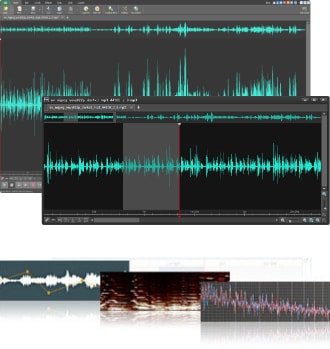
Audio Editor Features
- Sound editing functions include cut, copy, paste, delete, insert, silence, auto-trim and more
- Audio effects include amplify, normalize, equalizer, envelope, reverb, echo, reverse and many more
- Integrated VST plugin support gives professionals access to thousands of additional tools and effects
- Supports almost all audio and music file formats including mp3, wav, vox, gsm, wma, au, aif, flac, real audio, ogg, aac, m4a, mid, amr, and many more
- Batch processing allows you to apply effects and/or convert thousands of files as a single function
- Scrub, search and bookmark audio for precise editing
- Create bookmarks and regions to easily find, recall and assemble segments of long audio files
- Tools include spectral analysis (FFT), speech synthesis (text-to-speech), and voice changer
- Audio restoration features including noise reduction and click pop removal
- Supports sample rates from 6 to 196kHz, stereo or mono, 8, 16, 24 or 32 bits
- Works directly with MixPad multi-track audio mixing and Express Burn CD Recorder
- Easy to use interface will have you editing in minutes
Typical Audio Editing Applications
- Create ringtones from music files or recordings
- Trim sound bites out of longer audio files
- Reduce vocals from a music track
- Cut together audio for radio broadcasts or podcasts
- Save files for your iPod, PSP or other portable devices
- Record voiceovers for multimedia projects
- Restore audio files by removing noise, hissing or hums
- Normalize the level of audio files
System Requirements
- Works on Windows XP, Vista, Windows 7 and 8
- See Windows 98 and Windows 2000 for earlier versions
- Mac OS X 10.3 or later
Download WavePad Audio Editing Software
VideoPad Video Editor
Video Editing Software Anyone Can Use
Designed to be intuitive, VideoPad is a fully featured video editing program for creating professional looking videos in minutes. Making movies has never been easier.
Download VideoPad Video Editing Software for Windows
- Drag and drop video clips for easy video editing
- Apply effects and transitions, adjust video speed and more
- One of the fastest video stream processors on the market
- Edit video from any camcorder
Capture video from a DV camcorder, VHS, webcam, or import most any video file format including avi, wmv, 3gp, wmv and divx. - Full of transitions and visual effects
Over 50 visual and transition effects to add a professional touch to your movies. - Create videos for DVD, HD, YouTube and more
Burn your movie project to DVD for playback on TV, or as a standalone video file for enjoying on web and portable devices.
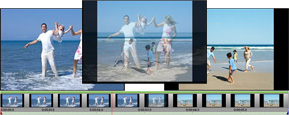 Stunning Video Transitions and Effects
| |
| |
Complete Video Optimization

| |
Share With Family and Friends

| |
Technical Information
Supported Input Formats
- Import Video
avi, mpeg, wmv, divX, Xvid, mpeg1, mpeg2, mpeg4, mp4, mov, vob, ogm, .3gp, H.264, RM and more - Import Images
bmp, gif, jpg, jpeg, png, tif, tiff, psd, tga, pcx and more - Import Audio
wav, mp3, mp2, mpga, m4a, ogg, avi, mid, flac, aac, wma, au, aiff, ogg, raw, dvf, vox, cda and more
Subscribe to:
Posts (Atom)


